

Filtering and Configuring Data
The Insider Transactions facility provides multiple ways to narrow down the data to exactly what you are looking for. You can use the top-level control panel to set broad parameters, and you can use the table’s column headers to quickly sort the specific data points displayed.
Top-Level Filters
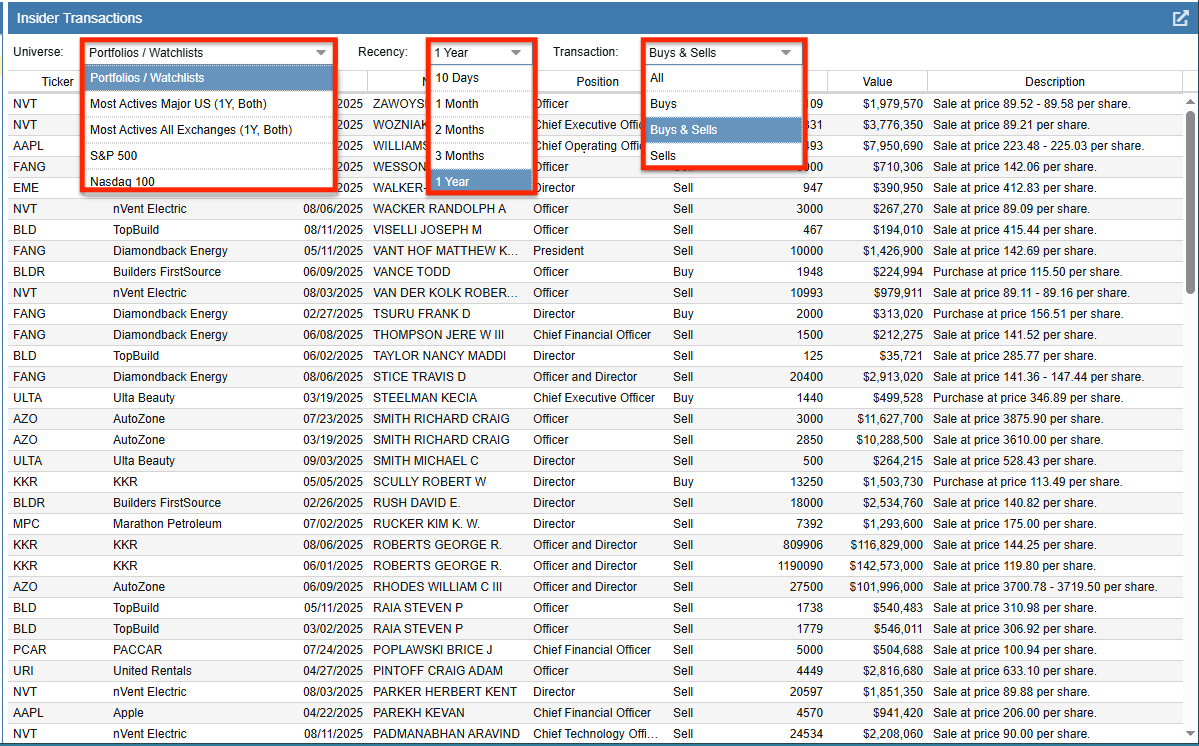
The control panel at the top of the display contains three primary dropdown menus that dictate which insider actions are loaded into the table.
Universe: This dropdown defines the pool of tickers to evaluate. The options include:
- Portfolios / Watchlists: Allows you to select specific portfolios or watchlists using the Navigation panel on the left.
- Most Actives: Displays the most actively traded companies, with options for Major US exchanges or All Exchanges.
- S&P 500: Limits the results to companies within the S&P 500 index.
- Nasdaq 100: Limits the results to companies within the Nasdaq 100 index.
Recency: This filters the insider actions by timeframe. You can choose to view actions that occurred within the last 10 Days, 1 Month, 2 Months, 3 Months, or 1 Year.
Transaction: This dropdown filters the table by the specific type of trade. Options include All, Buys, Buys & Sells, and Sells.
Column Control
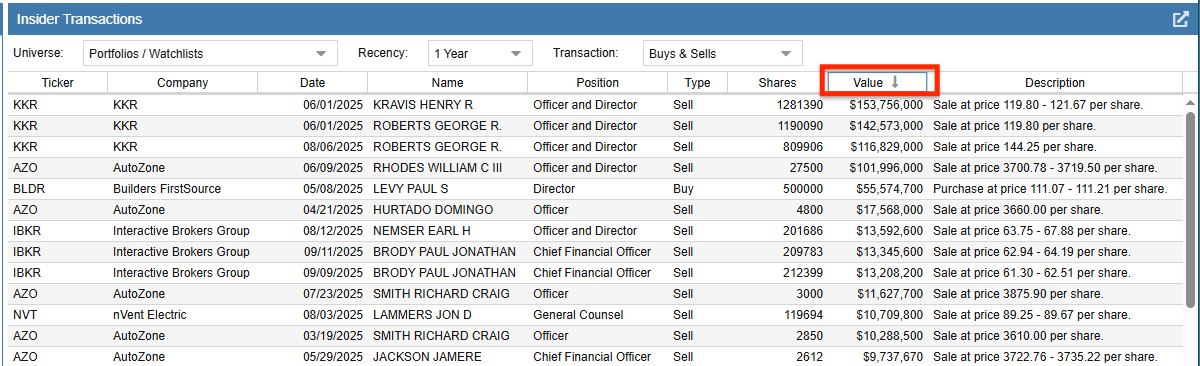
Once your data is loaded, the Insider Transactions table provides an intuitive way to organize your view. You can simply left-click on any column header to instantly sort the table ascending or descending by that specific metric. For example, clicking the Date column header allows you to see the absolute newest trades, while clicking Value brings the largest monetary transactions to the top.
Column Definitions
The Insider Transactions table provides a wealth of data regarding each insider trade. Below are the definitions for the available columns:
| Column | Definition |
|---|---|
| Ticker | The unique symbol that identifies a stock or fund. |
| Company | The full name of the company. |
| Date | The date when the insider transaction was executed and reported. |
| Name | The name of the individual insider who made the trade. |
| Position | The insider’s role or relationship to the company (e.g., Chief Executive Officer, Director, Officer). |
| Type | The action taken by the insider, classified as either a Buy or a Sell. |
| Shares | The total number of shares that were bought or sold in the transaction. |
| Value | The total dollar amount of the transaction, calculated by multiplying the shares traded by the execution price. |
| Description | Additional details summarizing the trade, typically showing the exact execution price or price range per share. |