Earnings Calendar Overview
Earnings Calendar
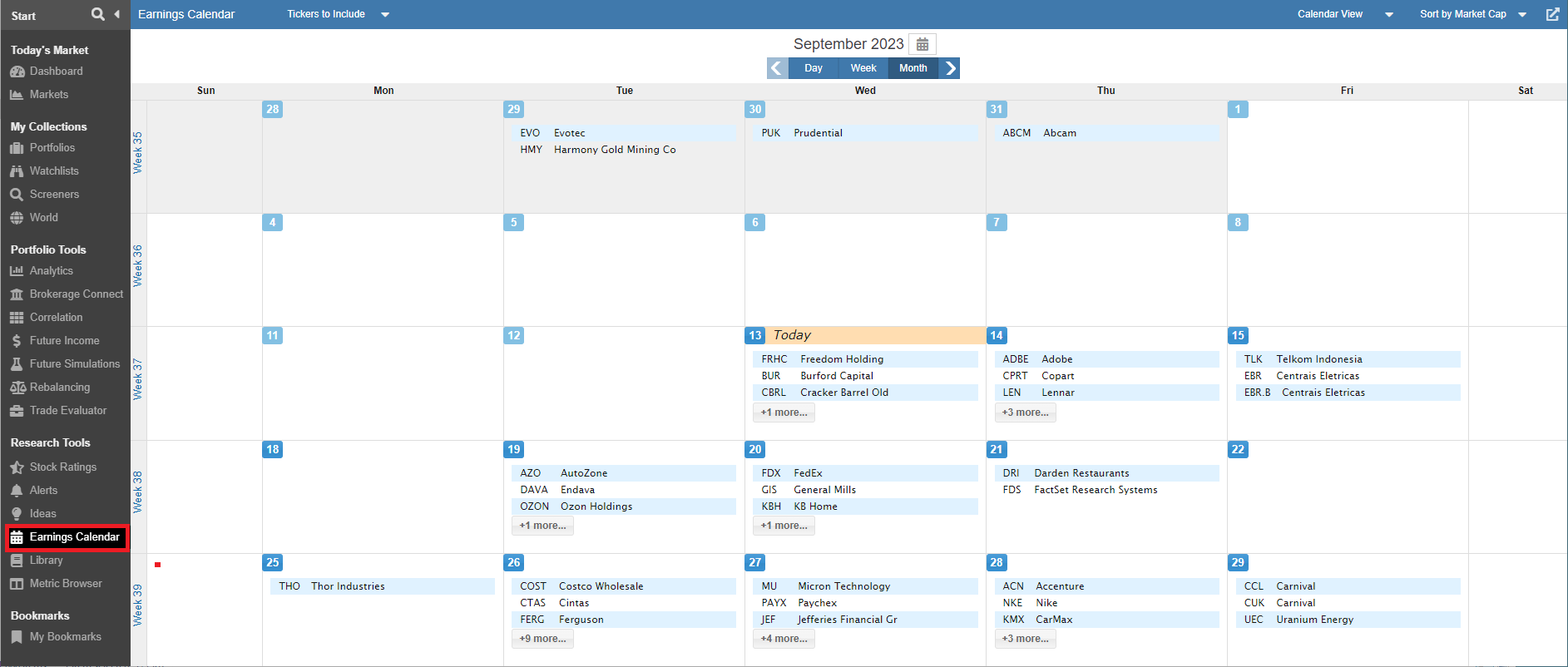
The Earnings Calendar is a comprehensive and flexible tool designed to track upcoming corporate earnings announcements. It allows you to monitor the reporting schedule for the entire Stock Rover investment universe or narrow your focus specifically to the companies within your personal portfolios, watchlists, or quotes lists.
The calendar offers several customization and filtering options to suit your workflow:
- Flexible Views: Display earnings schedules in a monthly, weekly, or daily format.
- Smart Sorting: Organize daily listings alphabetically or by Market Cap to prioritize the most influential reports.
- Targeted Filtering: Filter the calendar to show only stocks from specific Portfolios, Watchlists, or the broader Stock Universe.
- Detailed Insights: View critical data points such as the earnings estimate for the current quarter, previous quarter results, and status indicators showing whether an announcement is expected on time or is running late.
Accessing The Earnings Calendar
You can find the Earnings Calendar by selecting Earnings Calendar under the Research Tools section of the Start Menu.
If the Earnings Calendar is not currently visible, you can easily add it by customizing your Start Menu. Simply click the hamburger icon (☰) in the upper left-hand corner of the Start Menu to access the configuration options and toggle the Earnings Calendar tool on.