

Filtering and Configuring Data
The Analyst Ratings facility provides multiple ways to narrow down the data to exactly what you are looking for. You can use the top-level control panel to set broad parameters, and you can use the table’s column controls to sort, filter, and customize the specific data points displayed.
Top-Level Filters
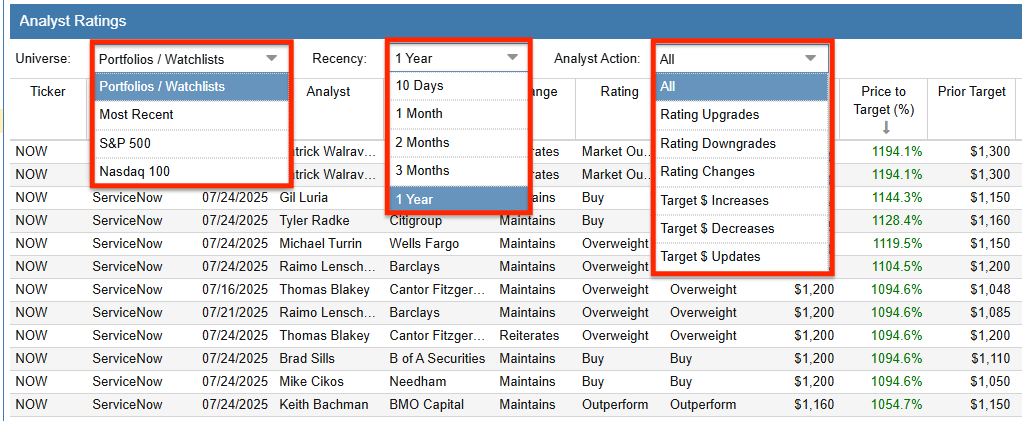
The control panel at the top of the display contains three primary dropdown menus that dictate which analyst actions are loaded into the table.
Universe: This dropdown defines the pool of tickers to evaluate. The options include:
- Portfolios / Watchlists: Allows you to select specific portfolios or watchlists using the Navigation panel on the left.
- Most Recent: Displays the most recent analyst actions across the entire market.
- S&P 500: Limits the results to companies within the S&P 500 index.
- Nasdaq 100: Limits the results to companies within the Nasdaq 100 index.
Recency: This filters the analyst actions by timeframe. You can choose to view actions that occurred within the last 10 Days, 1 Month, 2 Months, 3 Months, or 1 Year.
Analyst Action: This dropdown filters the table by the specific type of event. Options include All, Rating Upgrades, Rating Downgrades, Rating Changes, Target $ Increases, Target $ Decreases, and Target $ Updates.
Column Controls
Once your data is loaded, the Analyst Ratings table functions similarly to the main Stock Rover Table. You can left-click on any column header to instantly sort the table ascending or descending by that specific metric.
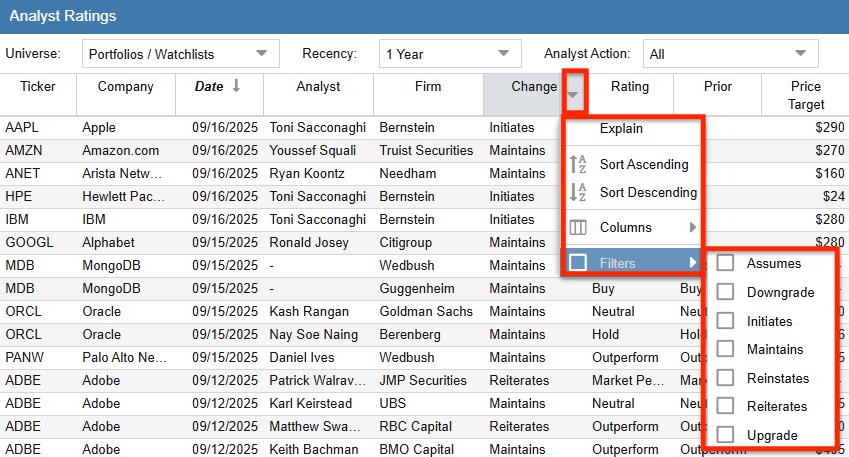
By right-clicking on any column header, you open a context menu that provides additional controls:
- Sort Ascending / Descending: Sorts the table by the selected column.
- Columns: Allows you to show or hide specific columns to customize your view.
- Filters: Allows you to apply specific criteria to a column (e.g., only showing rows where the “Fwd. Return (%)” is greater than 10%).
Column Definitions
The Analyst Ratings table provides a wealth of data regarding each analyst action. Below are the definitions for the available columns:
| Column | Definition |
|---|---|
| Ticker | The unique symbol that identifies a stock or fund. |
| Company | The full name of the company. |
| Date | The date when the analyst published this rating. |
| Analyst | The name of the analyst that published this rating. |
| Firm | The company employing the analyst for this rating. |
| Change | The difference between this rating and what the same analyst last published. |
| Rating | The rating this analyst gave this stock on this date. |
| Prior | The rating this analyst gave the stock on the last rating before this one. |
| Price Target | The price target this analyst forecasts the stock to achieve in a 12-18 month period. |
| Price to Target (%) | The percentage gain the stock would make if it reached the analyst’s target price. |
| Prior Target | The price target this analyst gave the stock on the last rating before this one. |
| Target Action | Describes the change, if any, to the analyst’s target price forecast. |
| Price on Date | The stock price on the day that the analyst rating was announced. |
| Current Price | The price of the stock today. |
| Fwd Change ($) | The dollar gain the stock has made since the analyst announced this rating. |
| Fwd Return (%) | The percentage gain the stock has made since the analyst announced this rating. |