

Troubleshooting Brokerage Connections
How to Force an Update
You may need to force a connection update if your brokerage password has expired or if the connection has become desynchronized. To force an update, follow these steps:
- Select Brokerage Connect in the Start Menu under Portfolio Tools.
- Click the gear icon next to the brokerage and select Edit Credentials, as shown in the screenshot below.
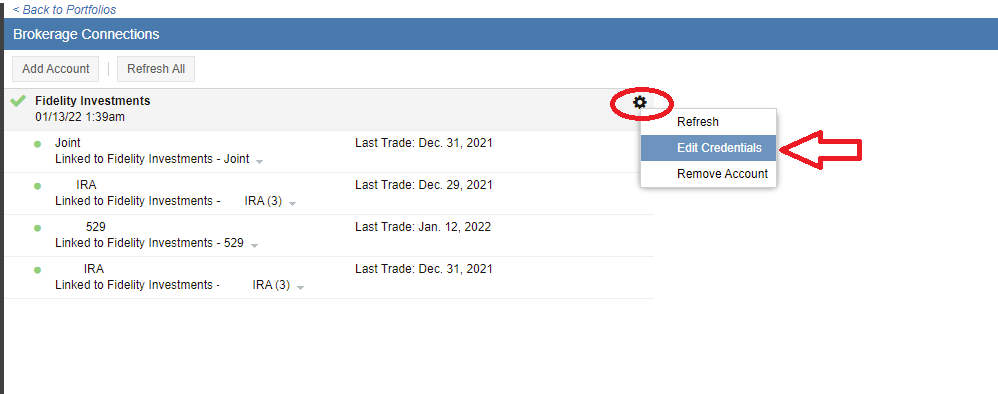
- If your password has changed, re-enter your account information and click Update. If your password has not changed, simply click Update to re-trigger the connection.
How to Force a Refresh
If your portfolio holdings appear stale or do not reflect recent trades, you can manually refresh the connection to pull the latest data.
- Select Brokerage Connect in the Start Menu under Portfolio Tools.
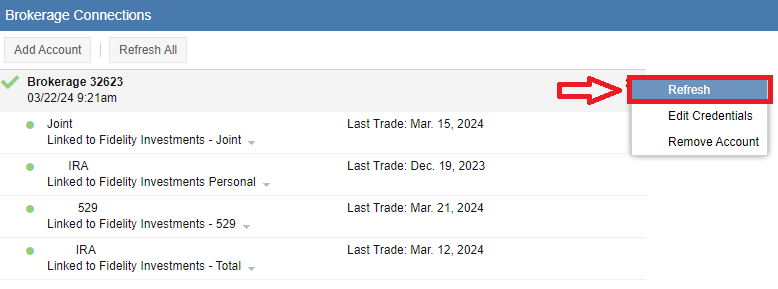
- Click the gear icon next to the brokerage and select Refresh, as highlighted below.
My Brokerage Connection is Failing with Error Code 403
An Error 403 typically indicates that a brokerage has updated its security or connection protocols, and Yodlee (our aggregator) is in the process of updating its code to match. We recommend waiting 24 hours and attempting the connection again. If the error persists, please contact our support team at support@stockrover.com.
Important: Do Not Remove Your Brokerage Connection if it Fails
If your brokerage connection begins to fail, we strongly recommend that you do not remove the connection. Removing the connection can lead to the loss of historical portfolio data that Stock Rover has tracked over time. Instead, try forcing an update via the “Edit Credentials” steps above. If the connection continues to fail, please contact us at support@stockrover.com for assistance.