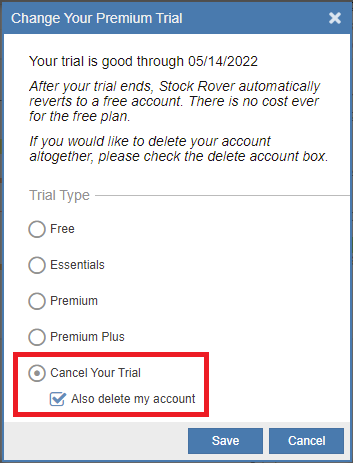
Turning off auto-renewal for your paid subscription is the same as cancelling. You will still have the use of the Stock Rover paid plan you have contracted for through the rest of your current billing period. After that, your account will revert to our Free account.
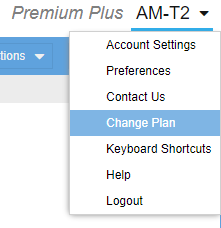
To turn off automatic renewal, which cancels your paid subscription going forward, first log in to your Stock Rover account. Then from within Stock Rover, click the down arrow next to your username in the top right corner, and select Change Plan as shown in the screenshot below.
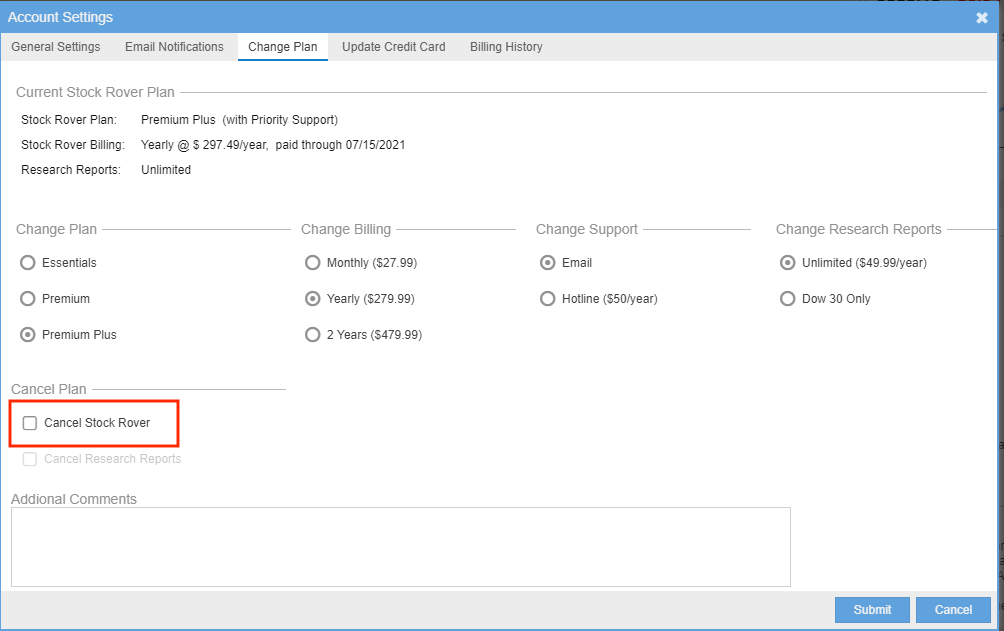
The window as shown below will display. From there you can select Cancel Stock Rover.
If you have a Research Reports subscription, which is a separate subscription, and wish to cancel that as well, be sure to also check the Cancel Research Reports box, which is below the Cancel Stock Rover box.
Also note that we do not issue refunds. If there is something we can do to keep you as a customer, please let us know.