

Tracking Dividend Income
 Printer Friendly
Introduction
This is the third of a three part series that focuses on the Stock Rover features that help you quickly identify, research, and track dividend investment candidates. The three part series is structured as follows:
- Part 1 – Screening for Dividend Stocks and ETFs
- Part 2 – Researching the Results of a Dividend Screener
- Part 3 – Tracking Dividend Income
In this blog post, we will cover Tracking Dividend Income using features from the Stock Rover Dashboard and from Stock Rover’s Portfolio Tools.
If dividends are a major part of your portfolio strategy, then dividend tracking is a crucial component to measuring success. Manually tracking dividend income can be a tricky proposition, especially when there are many portfolio holdings. Tracking becomes even more challenging when holdings change, for example after a portfolio is rebalanced. Throw multiple portfolios into the equation and dividend tracking enters a whole new level of complexity.
Stock Rover makes it easy to track dividend income. As we’ll see, portfolio dividends can be tracked at varying levels of detail, and they can be tracked over virtually any time period. In addition, Stock Rover’s dividend tracking features include the ability to project future portfolio dividend income.
The Dashboard
The Stock Rover Dashboard is available to all Stock Rover subscription plans and consists of multiple sections that deliver a performance overview of our portfolio(s) as well as that of the overall market.
Your Income
The Your Income section of the Dashboard is the part most pertinent to dividend tracking. It is highlighted in the screenshot of the Dashboard below.
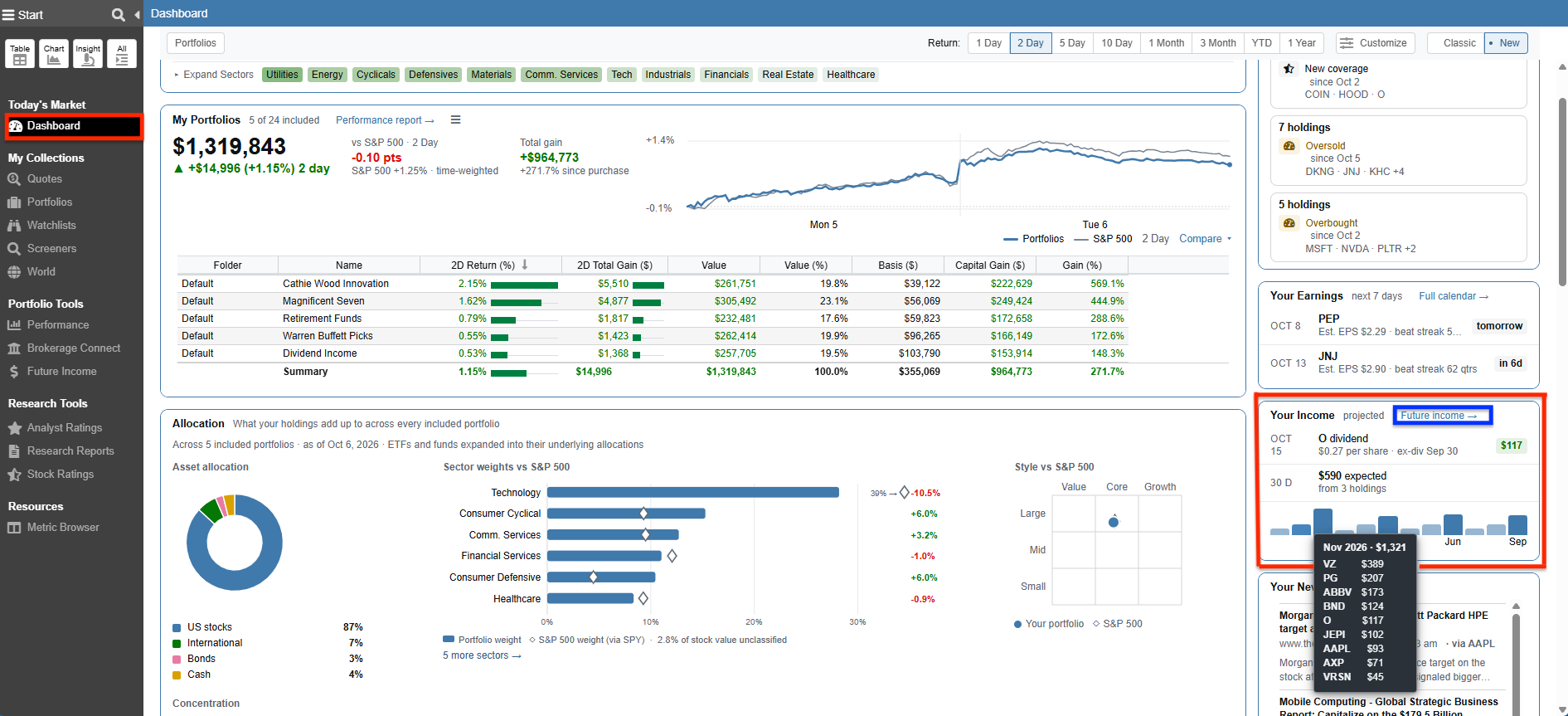
We can see that the Dashboard graphically projects your expected income out 1 year into the future. When you hover over a specific month in the chart, a tooltip appears detailing the expected income broken down by individual holding.
The income is computed based on the recent dividend payment history of the individual stocks, ETFs, and mutual funds in the portfolios.
The projection assumes no increase or decrease to the current dividend rate that a company, ETF, or fund pays.
You can easily launch the full Future Income tool for more detail by clicking on the Future income → link in the top right corner of the section.
Note: The full Future Income tool requires a subscription plan.
Stock Rover’s Portfolio Tools
Portfolio Tools consists of a group of tools that help us manage our portfolios. Below, we’ll focus on the two tools that provide dividend income tracking; which are Performance and Future Income.
Performance
The Performance tool analyzes the overall performance of our portfolio(s), as well as the performance of the individual holdings.
Performance returns a number of metrics, including those related to the change in value, dividend income, yield, appreciation, return on investment, internal rate of return, time-weighted return, unrealized gain, realized gain, and much more.
The return metrics automatically assume dividend reinvestment, so there is no need for us to edit the portfolio to account for dividends either by adding cash or purchasing shares.
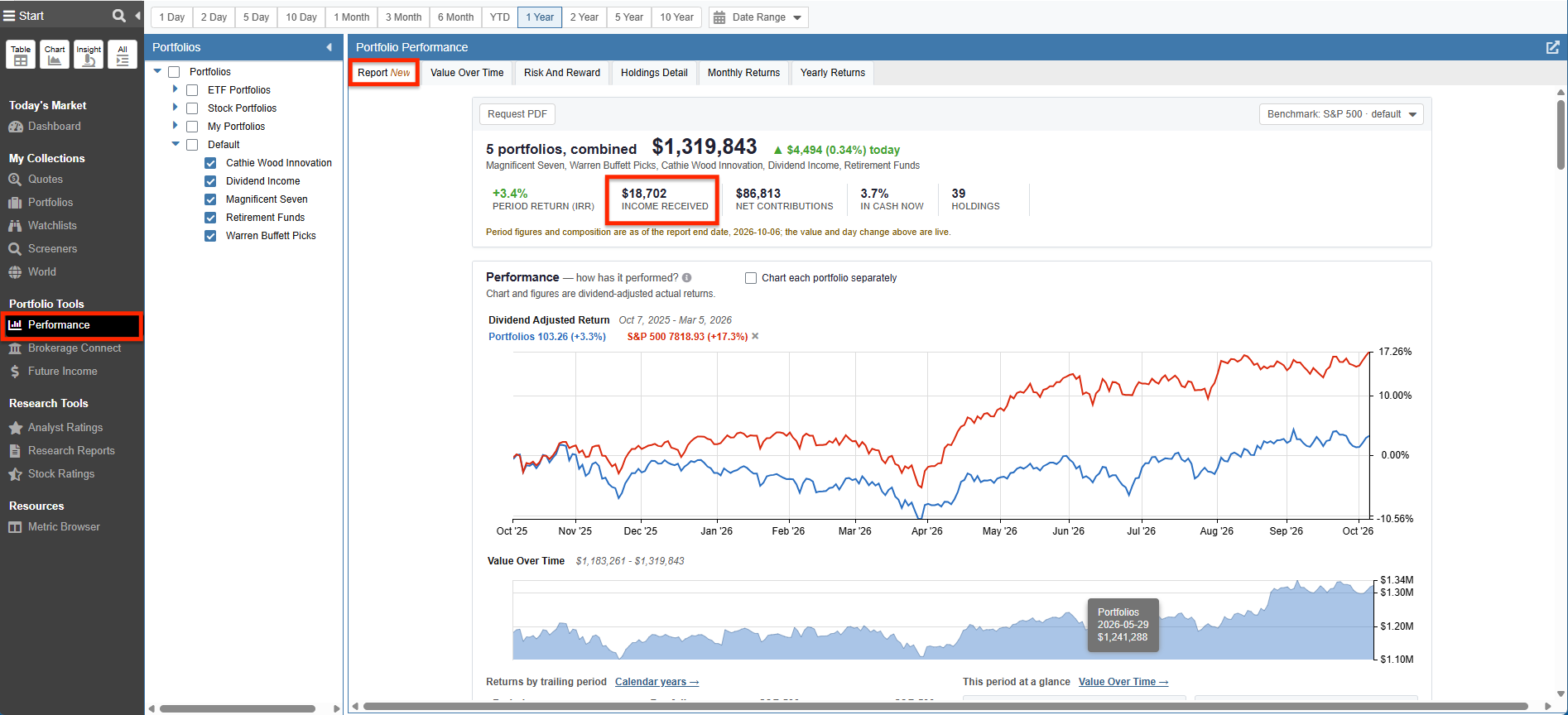
Report
The Report tab generates a comprehensive, multi-page tear sheet (which can be easily exported as a PDF) detailing the overall health of your portfolio—covering everything from composition and risk to underlying fund fees. At the very top of this generated report, it highlights key baseline metrics, including the total “Income Received” across your combined portfolios for the selected period.
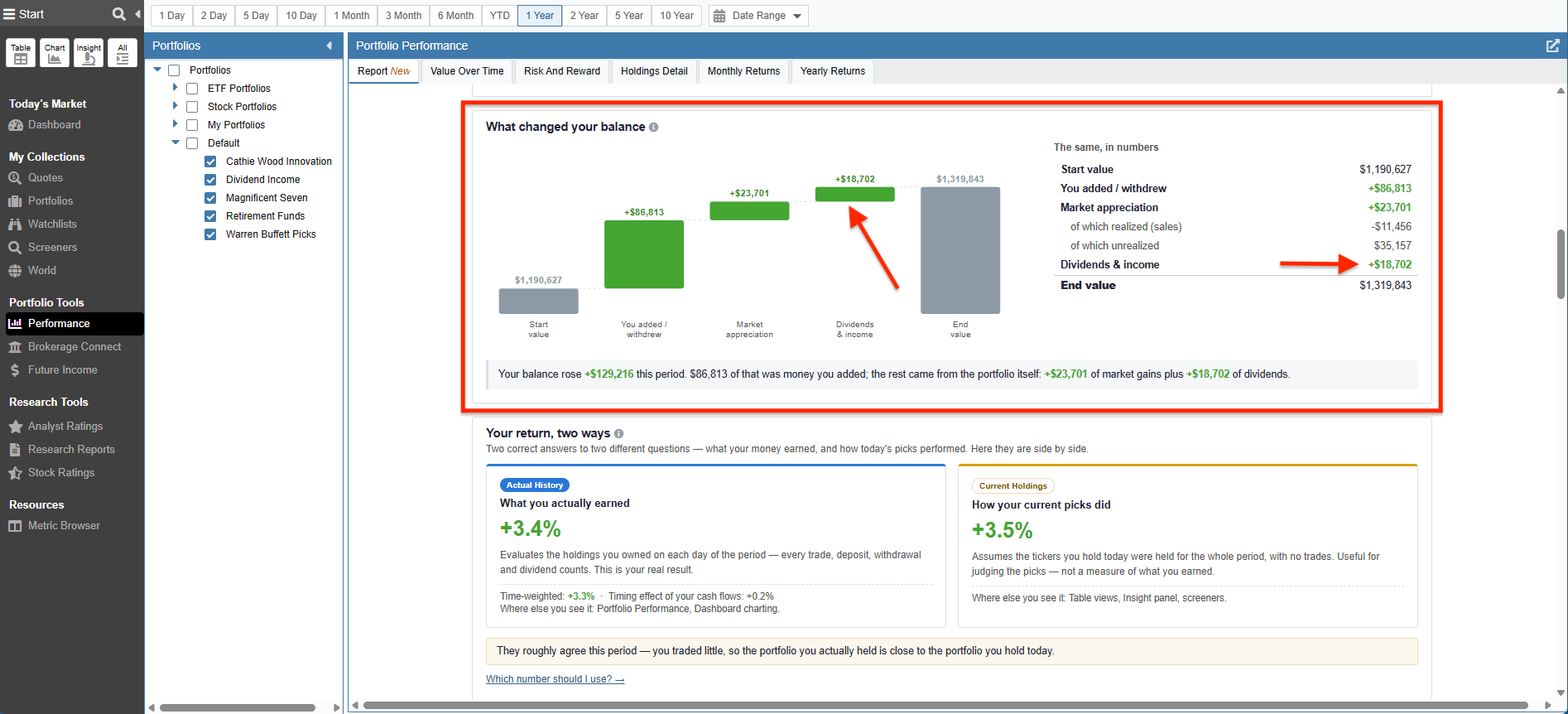
Further down the report, the “What changed your balance” section features a waterfall chart that visually breaks down exactly how your portfolio’s end value was reached. This chart explicitly carves out the positive impact of “Dividends & income” alongside market appreciation and your net contributions.
Toward the bottom of the document, a dedicated “Income” section provides a detailed look at what your portfolio(s) pays. This section recaps the actual cash dividends accrued over the reporting period and the annualized yield. It also projects your income out for the next 12 months by applying announced dividend payments to your current positions. It features a handy bar chart for projected monthly income, a list of upcoming dividend payments, and a quick summary highlighting your top income producers and best projected month.
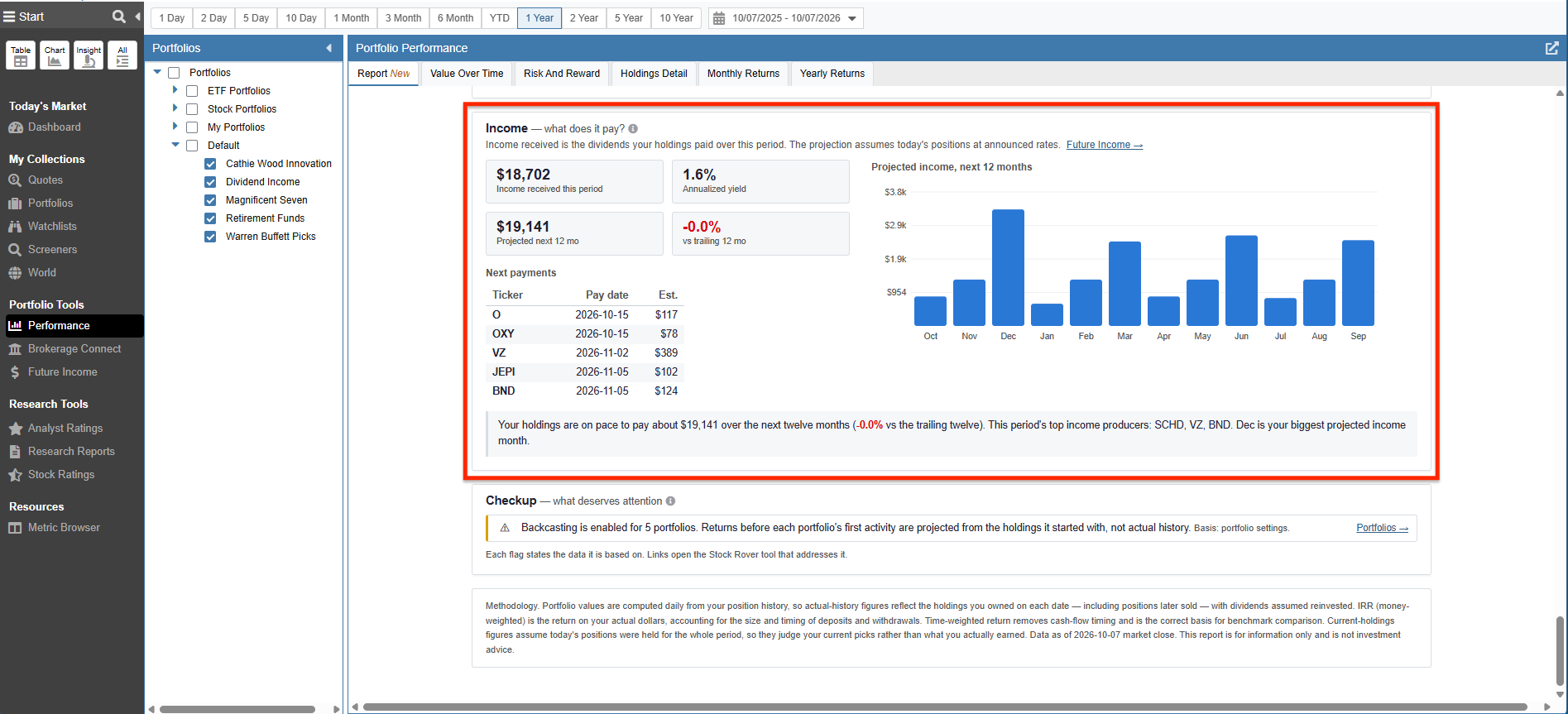
Stock Rover Tip: Income Metrics Defined
- Income received: Total cash dividends and distributions accrued over the reporting period.
- Annualized yield: Period income relative to the portfolio’s average value, annualized.
- Projected income: The next twelve months of announced dividend payments applied to today’s positions.
Value Over Time
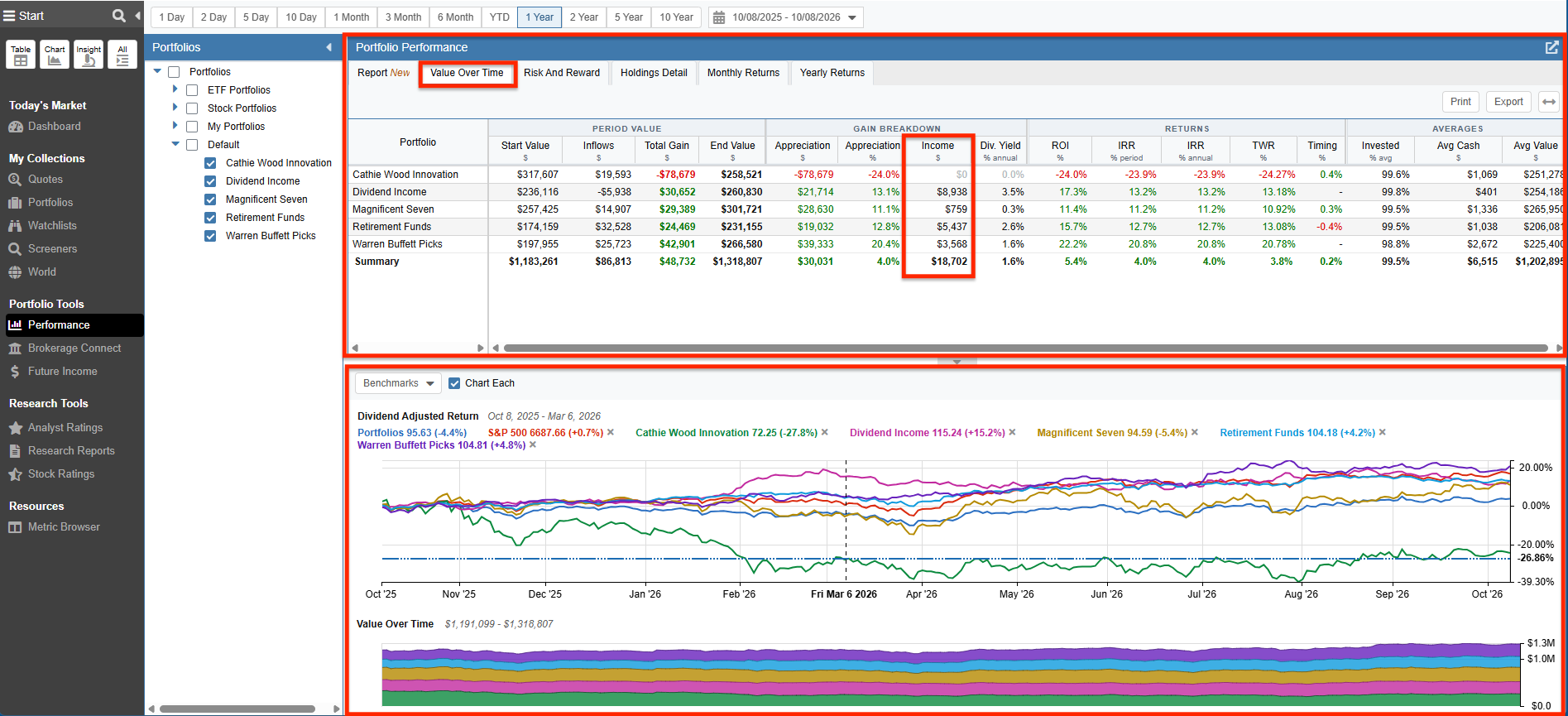
The Value Over Time tab of Performance shows us how our portfolios’ values have changed over time, factoring in both inflows (dividends being one of them), outflows, and the underlying change in the value of the investments themselves.
- The Table shows the Income ($) column. This column displays the total cash dividends accrued in the time period of the report. In our example we selected a 1 year time period to analyze our portfolios.
- The Price Change Chart shows the dividend-adjusted return for each portfolio, as well as the dividend-adjusted return of the combined portfolios.
Holdings Detail
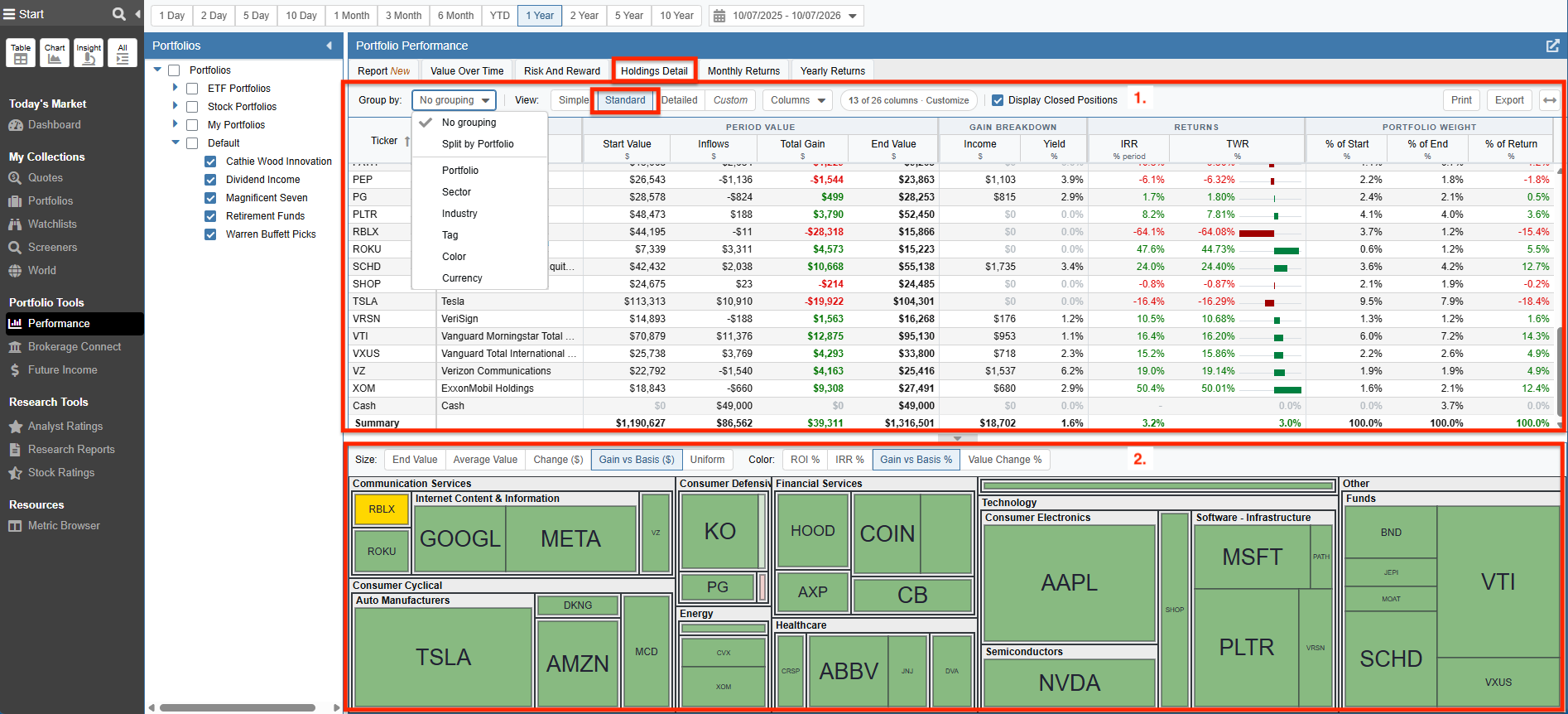
The Holdings Detail tab of Performance shows the contribution of the different holdings of the portfolio(s) to the overall portfolio(s) return.
- The Table shows the Income ($) column. This displays the total cash dividends accrued over the selected period for each of the holdings. For this view, we selected the Standard display option. If we would like to group the holdings by a category, we select the Group by: option and choose the grouping category. We can choose to see our cash dividends grouped by Portfolio, Sector, Industry, Tag, Color, or Currency.
- The Holdings Detail Map displays a heat map of the portfolio tickers grouped by sector. The tiles are sized and colored based on the options for “Size” and “Color”. In the screenshot below, the Size option is Gain vs Basis $ and the Color option is Gain vs Basis %. Note that the heat map calculations automatically account for dividends.
Future Income
The Future Income Tool projects future dividend income on a monthly, quarterly, and yearly basis. The income is based on the individual stocks, ETFs, and mutual funds that comprise our portfolio(s).
Stock Rover provides a projection based on recent dividend payment history. The projection assumes no increases or decreases to the current dividend rate. The projections are just that – projections. If a portfolio is comprised of healthy companies that may be increasing their dividends in the future, then Stock Rover’s projections will be somewhat conservative. On the other hand, if a portfolio contains companies that are suddenly under financial stress and the future dividends could be potentially cut or even eliminated, then Stock Rover’s projections will be optimistic.
Summary Level
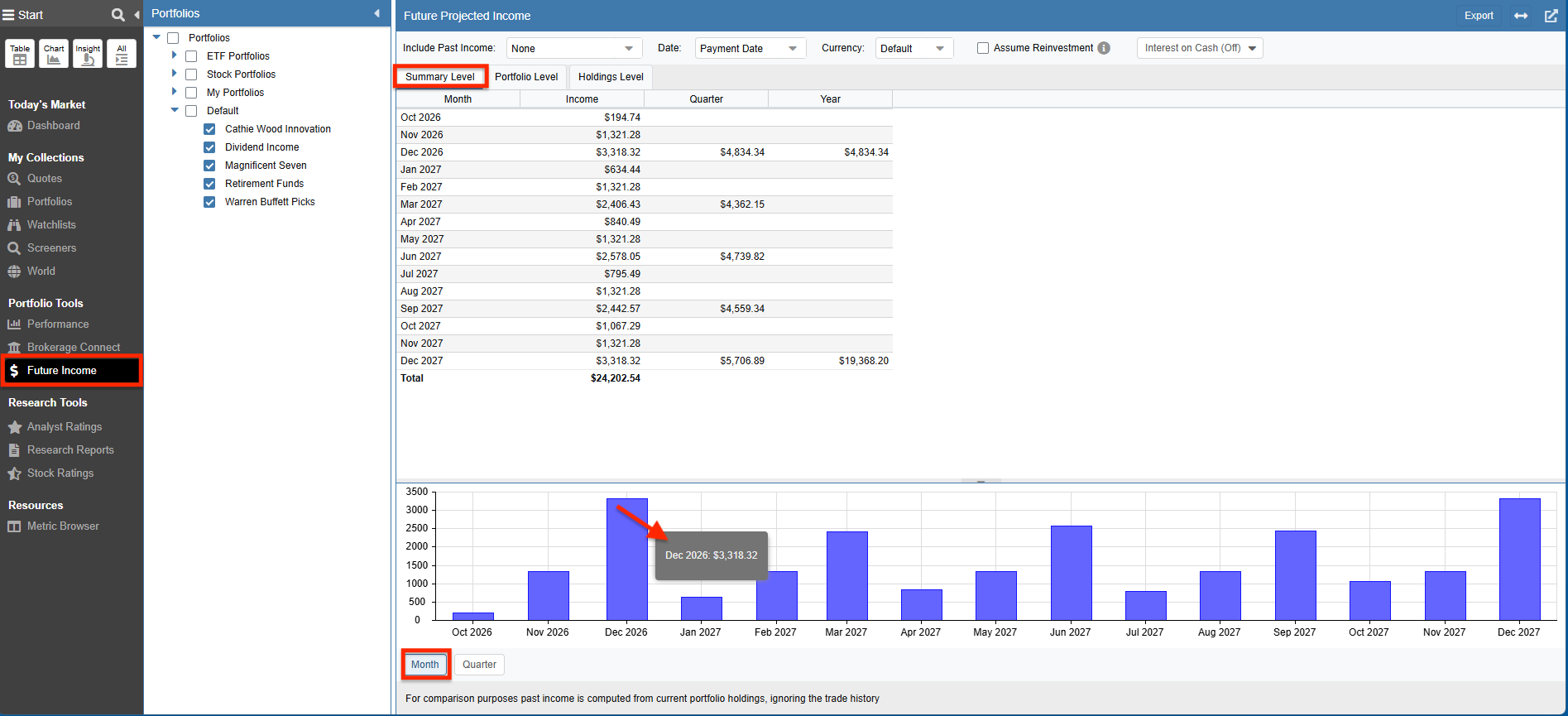
When we select the Summary Level tab in the Future Income tool, we see a display with monthly, quarterly, and yearly dividend income values.
Below we see the future dividend income values across our selected portfolios.
The chart is showing us the dividend income at the monthly level. However, we can also select to display quarterly values.
When we mouse over the chart, the value for the selected bar is displayed.
Portfolio Level
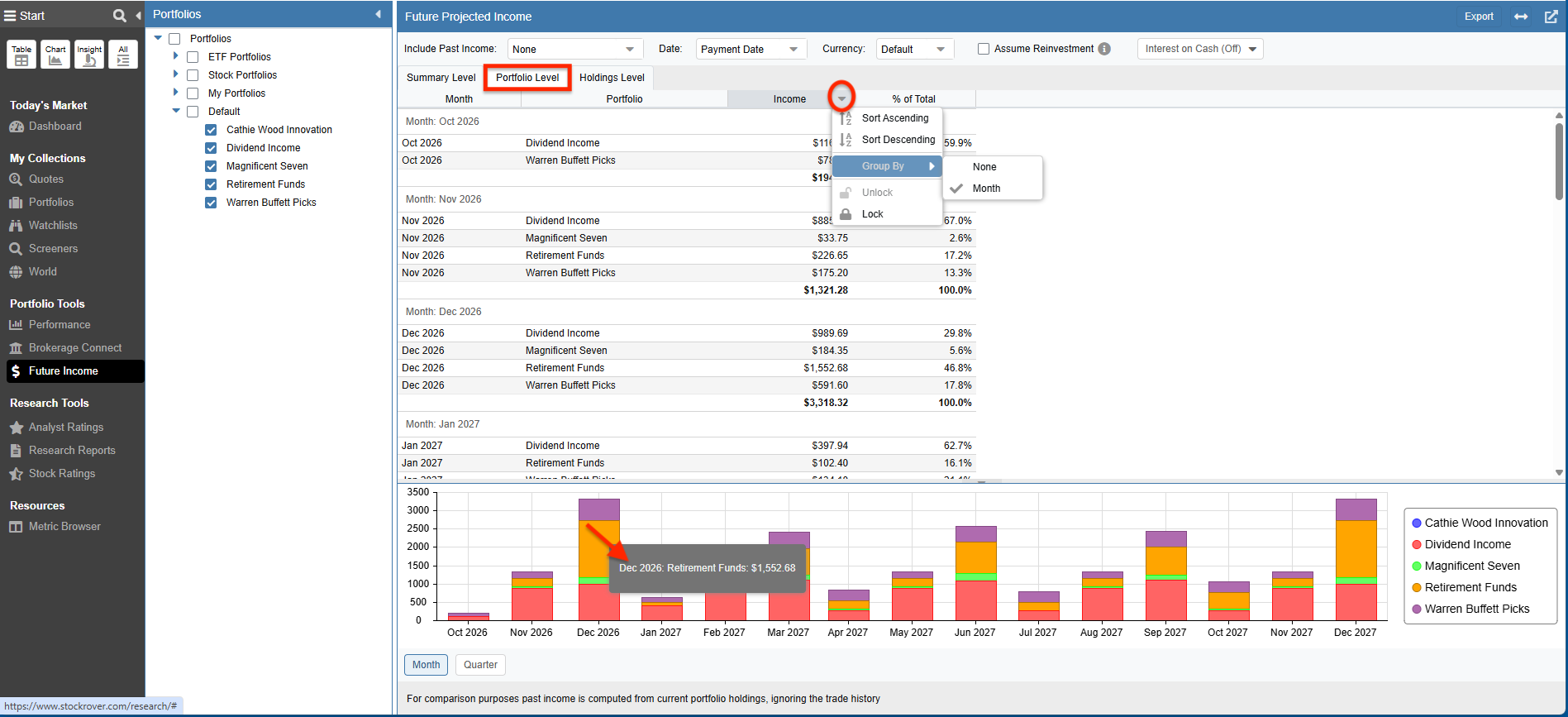
When we select the Portfolio Level tab, we see the monthly future dividend income, broken down by portfolio. We can also click on a column heading for sorting and grouping options.
The chart below is showing us the per portfolio income at a monthly level.
Holdings Level
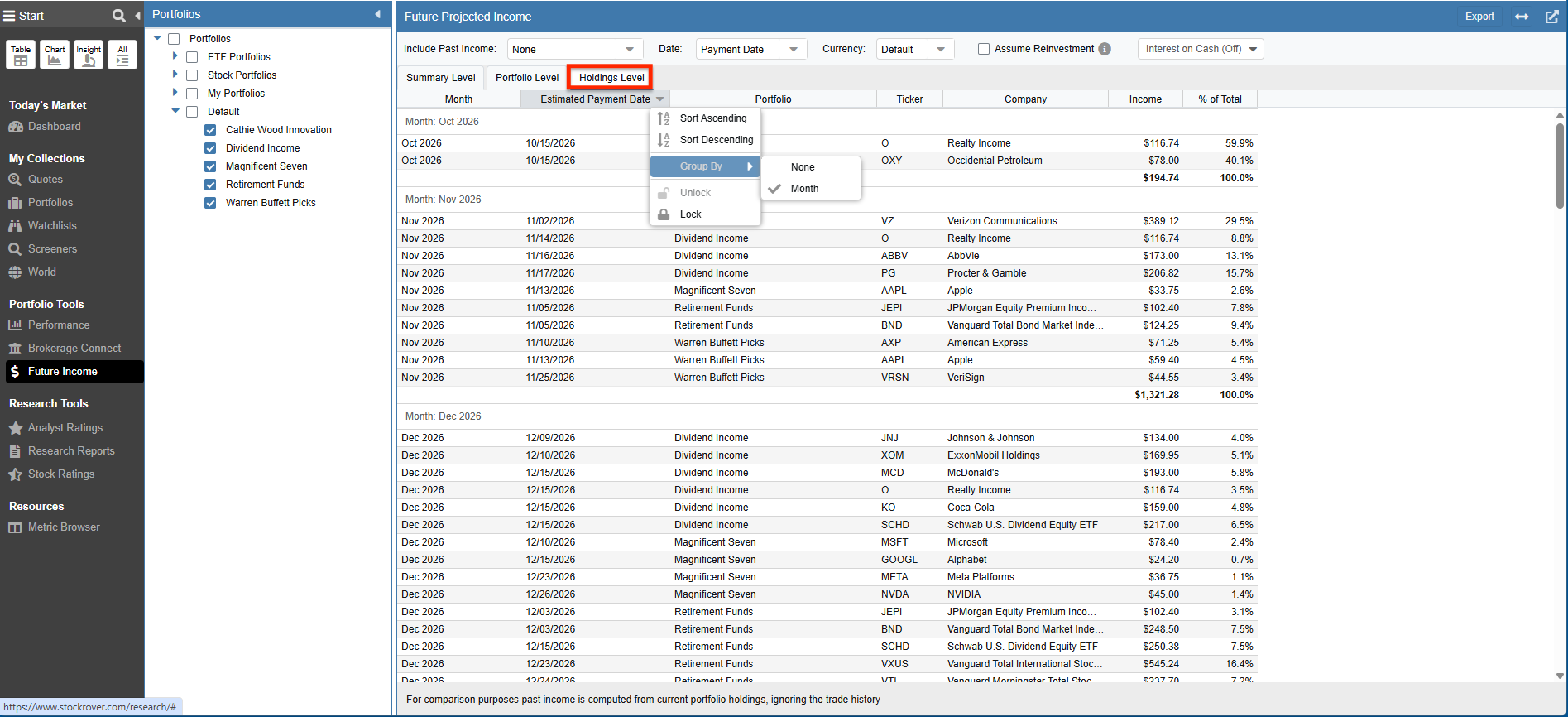
When we select the Holdings Level tab, we get a detailed monthly future dividend income breakdown by individual holding. For each holding, we see the estimated payment date along with the income amount and the percent of the total income it represents.
Summary
This is the final part of our three part series focusing on Stock Rover features that help you quickly identify, research, and track dividend investment candidates.
Part 1 covered Screening for Dividend Stocks and ETFs. Part 2 covered Researching the Results of a Dividend Screener. This part focused on Dividend Tracking.
I hope you found this series on Dividend Investing to be useful and informative.
Frequently Asked Questions
How does Stock Rover project future dividend income?
Stock Rover computes projected income based on the recent dividend payment history of your individual stocks, ETFs, and mutual funds. It assumes no increases or decreases to the current dividend rate, making the projections a reliable baseline based on current payout data.
Do the portfolio performance metrics account for dividend reinvestment?
Yes, the return metrics in Stock Rover’s Performance tool automatically assume dividend reinvestment. There is no need to manually edit your portfolio to add cash or purchase shares just to account for dividends.
How can I tell how much of my portfolio growth came from dividends versus market appreciation?
The Performance Report tab features a “What changed your balance” waterfall chart. This visual explicitly separates the positive dollar impact of your “Dividends & income” from your actual market appreciation and net cash contributions.
Can I export or print my dividend income reports?
Yes. The Report tab in the Performance tool generates a comprehensive, multi-page tear sheet covering your performance, income, and asset allocation. This entire document can be easily exported as a PDF to share or keep for your personal records.
Comments
Leave a Reply
Top
Can you track an actual portfolio overtime, with dividends from closed positions, and new positions over the period held?
Hello Conrad,
Yes, you can readily accomplish this in the Analytics. Please see https://www.stockrover.com/help/analytics/analytics-overview/
The Income column under the “Value Over Time” and “Holdings Detail” tabs shows the dividend income for the selected period of time.
The Value Over Time tab displays dividend income at the portfolio level, while Holdings Detail tab displays dividend income at the holdings level.
Regards,
Ken