

Portfolio Analytics with Stock Rover

February 5, 2026 Printer Friendly Printer Friendly

Key Takeaway: A positive return does not always mean a good investment. This guide explains how to use Portfolio Analytics to see the big picture, the Future Income Tool to gain cash flow clarity, and Future Simulations to stress-test your portfolio’s long-term survival.

Imagine your portfolio is up 10% this year. You might feel great about that return. But what if the S&P 500 is up 20%? Suddenly, that 10% gain doesn’t look like a victory—it looks like a missed opportunity.

Most brokerage accounts only tell you what happened. To invest like a pro, you need to understand why it happened. You need to distinguish between luck (riding a bull market) and skill (generating superior, risk-adjusted returns).

In Part 1, we established the baseline: tracking your positions and daily changes. Now, we move from observation to analysis.

In Part 2 of the Stock Rover Portfolio Guide, we dive into the analytics tools that separate casual tracking from professional-grade analysis.

1. The Big Picture: Portfolio Analytics

The Analytics section is your “truth serum.” It allows you to visualize your performance over any time period and, crucially, compare it against a benchmark (like the S&P 500) to see if you are truly adding value.
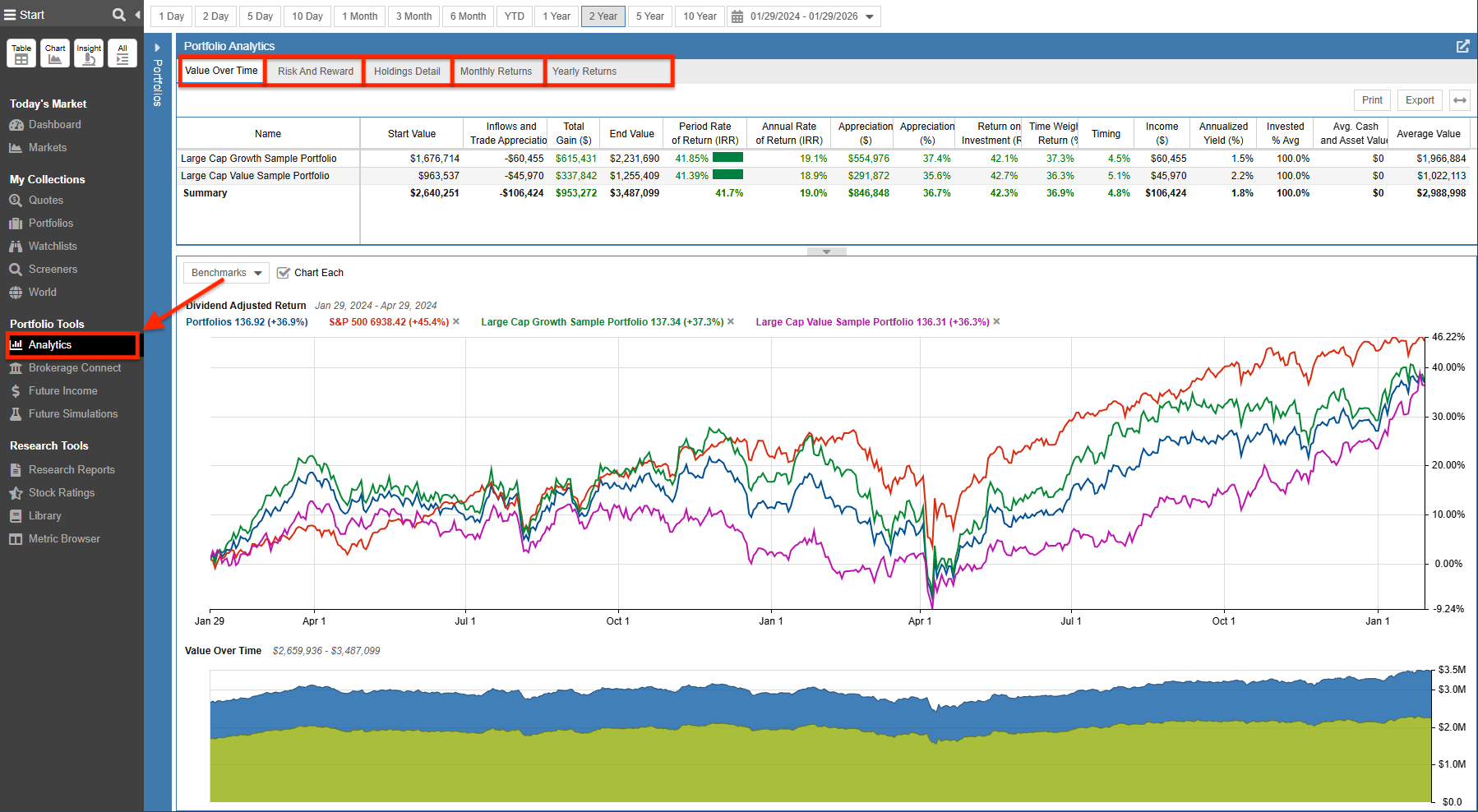
Portfolio Analytics

The Analytics tool is divided into five specific views, each answering a different question about your financial health:

What it Shows: Combines three powerful views: a Summary Table of key metrics (Total/Annualized Return), a Returns Chart comparing percentage growth vs. a benchmark, and a Value Chart tracking your actual dollar balance history.

Practical Use: Determines if your strategy is actually beating the market or just tracking it.

What it Shows: A deep dive into risk metrics like Beta, Volatility, Max Drawdown, and the Sharpe Ratio.

Practical Use: Reveals if you are taking on excessive risk (high volatility) to achieve your returns.

What it Shows: A granular table showing exactly how much each individual position contributed to your total portfolio return.

Practical Use: Identifies which specific holdings are doing the heavy lifting and which are dead weight.

What it Shows: Viewable as a heatmap grid or a bar chart, allowing you to benchmark performance against other portfolios, indexes, or tickers.

Practical Use: Helps spot seasonality trends (e.g., “I always lose money in September”).

What it Shows: Displays as a bar chart and table, allowing you to benchmark annual performance against other portfolios, indexes, or tickers.

Practical Use: Provides the long-term “report card” of your investing career.

2. Cash Flow Clarity: The Future Income Tool

For dividend investors, “total return” is often secondary to reliable cash flow. The Future Income Tool projects your expected dividend income for the current year and the year ahead based on your current holdings.
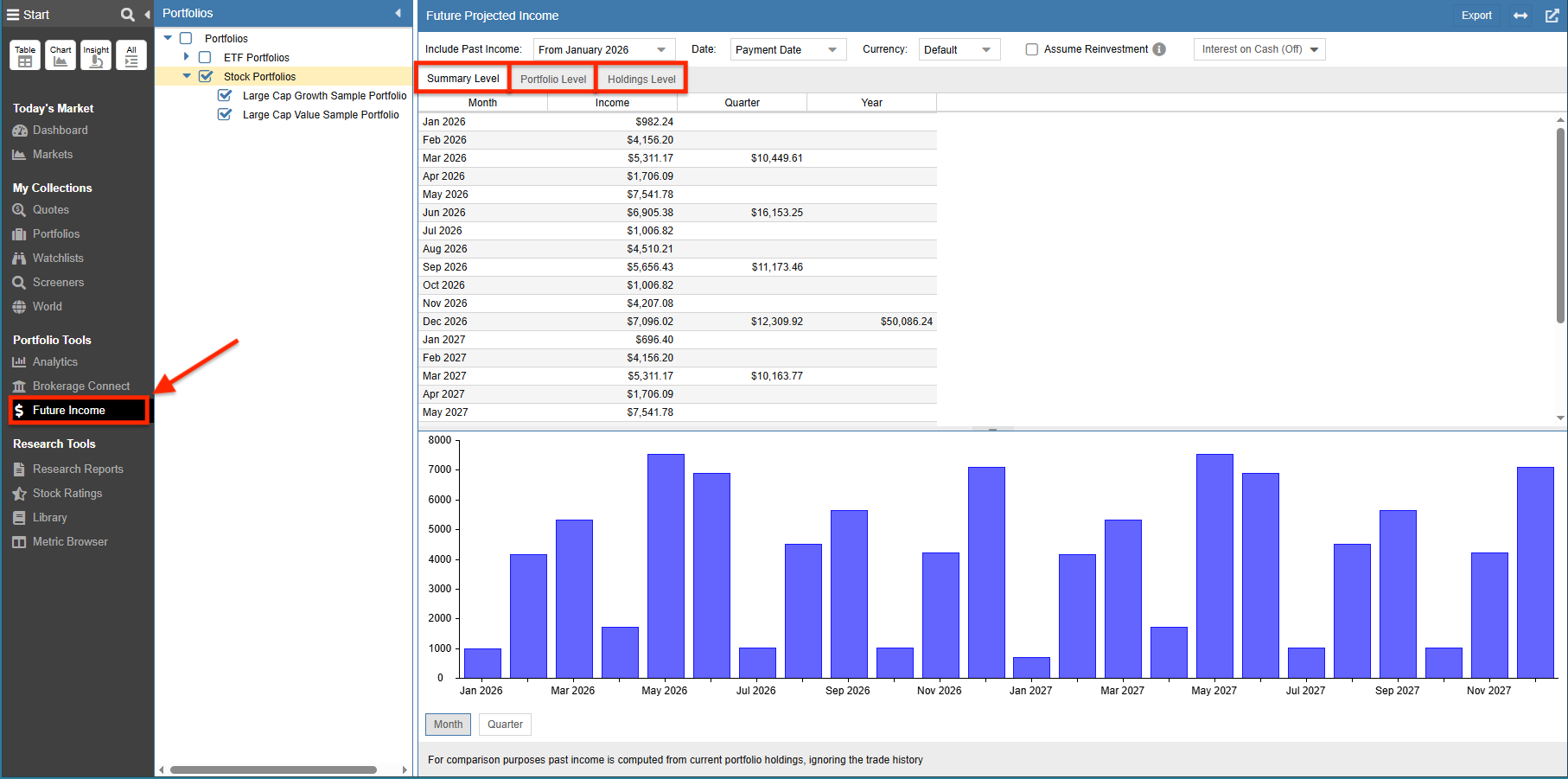
The Future Income Tool

It offers three levels of detail to help you budget with precision:

Summary Level
A high-level calendar view of your total estimated income for each month, helping you spot seasonal income gaps.
Portfolio Level
Breakdown of which specific portfolios (e.g., IRA vs. Taxable) are generating the bulk of your cash flow.
Holdings Level
The deepest dive, showing exactly which holdings are paying you, how much, and on what estimated date.

3. Stress Testing: Future Simulations

Historical data is useful, but what about the future? Stock Rover’s Future Simulations tool performs a Monte Carlo simulation to stress-test your portfolio against thousands of random market scenarios.
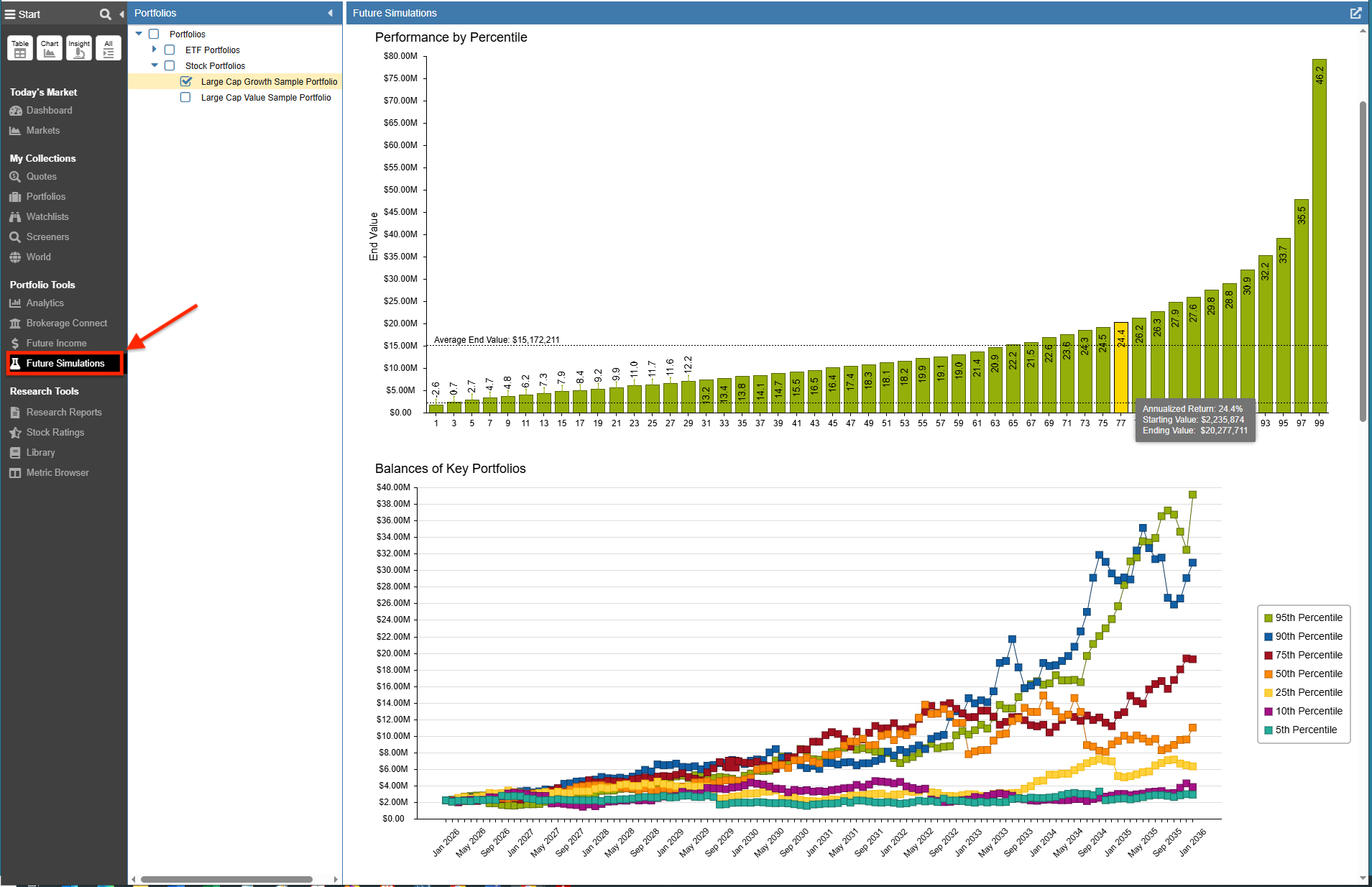
Future Simulations

It allows you to model thousands of potential future paths to answer “What if?” questions with specific visual tools:

Performance by Percentile
Don’t just rely on the average. This chart shows the full range of possibilities, identifying your “Worst Case” (10th percentile) and “Best Case” (90th percentile) outcomes.
Survival Probability
Essential for retirement planning. You can simulate monthly withdrawals (e.g., $5,000/month) to see the statistical probability of your money lasting 10, 20, or 30 years.
Balances of Key Portfolios
Displays the actual month-by-month paths for seven distinct probability scenarios (ranging from the 5th to the 95th percentile), visualizing exactly how volatile (or smooth) the ride could be.

Common Questions About Portfolio Analytics

How does Stock Rover Portfolio Analytics compare to standard brokerage reporting?
Unlike standard brokerages that often show simple percentage gains, Stock Rover uses Time-Weighted Return (TWR) to benchmark performance against indices like the S&P 500. This method eliminates the distortions caused by cash inflows and outflows, providing a true measure of your investment skill.

How does the Future Income Tool forecast my dividends?
The tool projects income by checking your current holdings against recent dividend payment history. It assumes the current dividend rate will remain constant (it does not speculate on future increases), while using historical payment schedules to estimate the specific payment dates for the current and following year.

Note: Advanced Portfolio Analytics, Future Income, and Future Simulations require a Premium or Premium Plus subscription. You can explore all plan options here.


Leave a Reply

Your email address will not be published. Required fields are marked *

We value your privacy and will not display or share your email address

This site uses Akismet to reduce spam. Learn how your comment data is processed.


Top