Rebalancing is the broccoli of investing: everyone knows they should do it, but few actually enjoy it. Why? Because it feels counterintuitive. To rebalance, we often have to sell the stocks that are working and buy the ones that aren’t.
Yet, this mechanical process is the secret to buying low and selling high. In Part 3 of the Stock Rover Portfolio Guide, we explore how to automate this critical discipline using a real portfolio example.
Contents
1. The Reality Check: When Value Beats Growth
Let’s look at a real scenario. On Jan 1, 2025, we built a $100,000 portfolio with a clear strategy: 50% Aggressive Growth (Tech) and 50% Safety/Value. We expected Tech to lead the charge.
The Surprise (Feb 2026): The market didn’t follow the script. As we see in the Analytics [6] below, the “boring” stocks were the massive winners, while Tech lagged significantly.
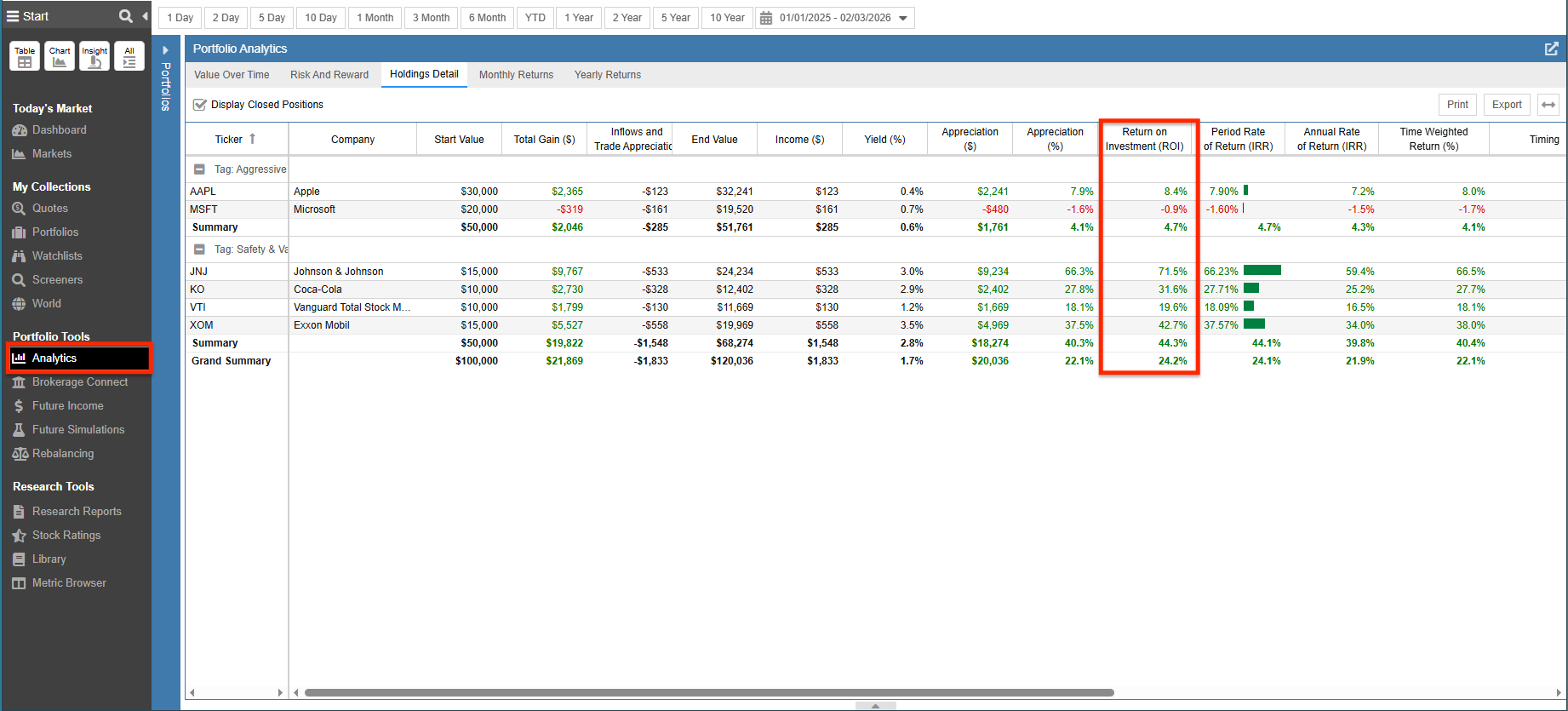
(Above: The “Return on Investment” column reveals the story. JNJ (+71.5%) and XOM (+42.7%) crushed the Tech giants.)
2. Monitoring: Visualizing the Drift
Because JNJ and XOM grew so fast, they are “eating” the rest of our portfolio. Our Safety/Value slice has ballooned to nearly 57% of total assets, leaving us under-exposed to Tech just as it might be ready to recover.
Stock Rover’s Rebalancing Tool [7] visualizes this mismatch perfectly in the “Current %” vs. “Planned %” columns:
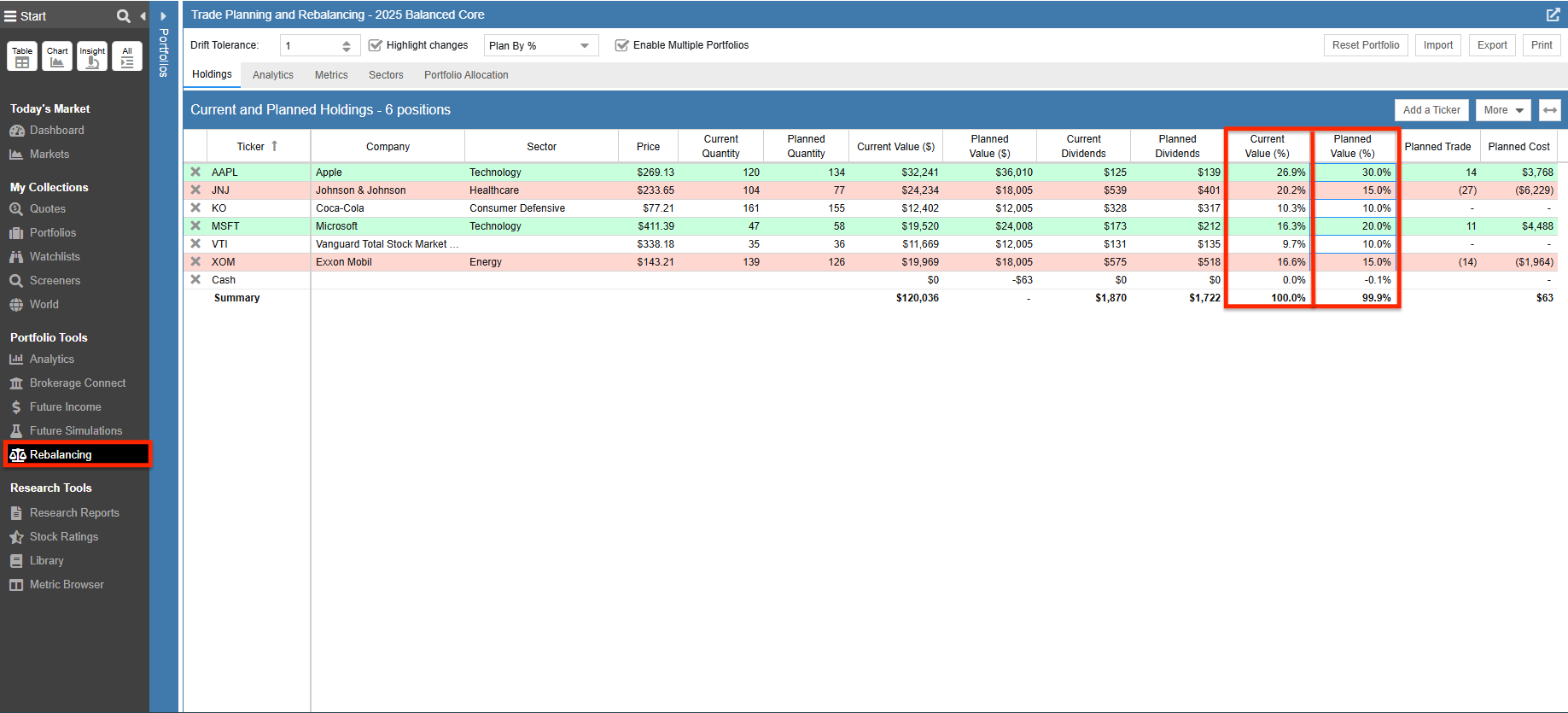
(Above: The Rebalancing Tool highlights exactly where we are off-track. JNJ is at 20.2% (vs. 15% Plan), while MSFT has shrunk to 16.3% (vs. 20% Plan).)
- JNJ Status: Overweight (20.2% Actual vs 15% Target). We are holding too much risk in a single healthcare stock.
- MSFT Status: Underweight (16.3% Actual vs 20% Target). We are missing out on our intended tech exposure.
3. Automating the Math: The Fix
This is where the psychology gets hard. Our gut tells us to keep riding JNJ because it’s winning. It tells us to avoid Microsoft because it’s down.
Rebalancing forces us to do the smart thing, not the emotional thing.
For this rebalance, we rely on our configured Drift Tolerance [8]. We set this to 1 (representing 1 percentage point). Think of this as a strategic “cushion” around your target allocations. It acts as a filter, preventing the Rebalancing Tool from suggesting trades for every minor fluctuation. Instead, it only flags trades when a position has drifted far enough (more than 1% off target) to actually alter your risk profile.
As you can see in the screenshot below, Stock Rover makes it impossible to mistake your next move: buys are highlighted in green and sells are highlighted in red.
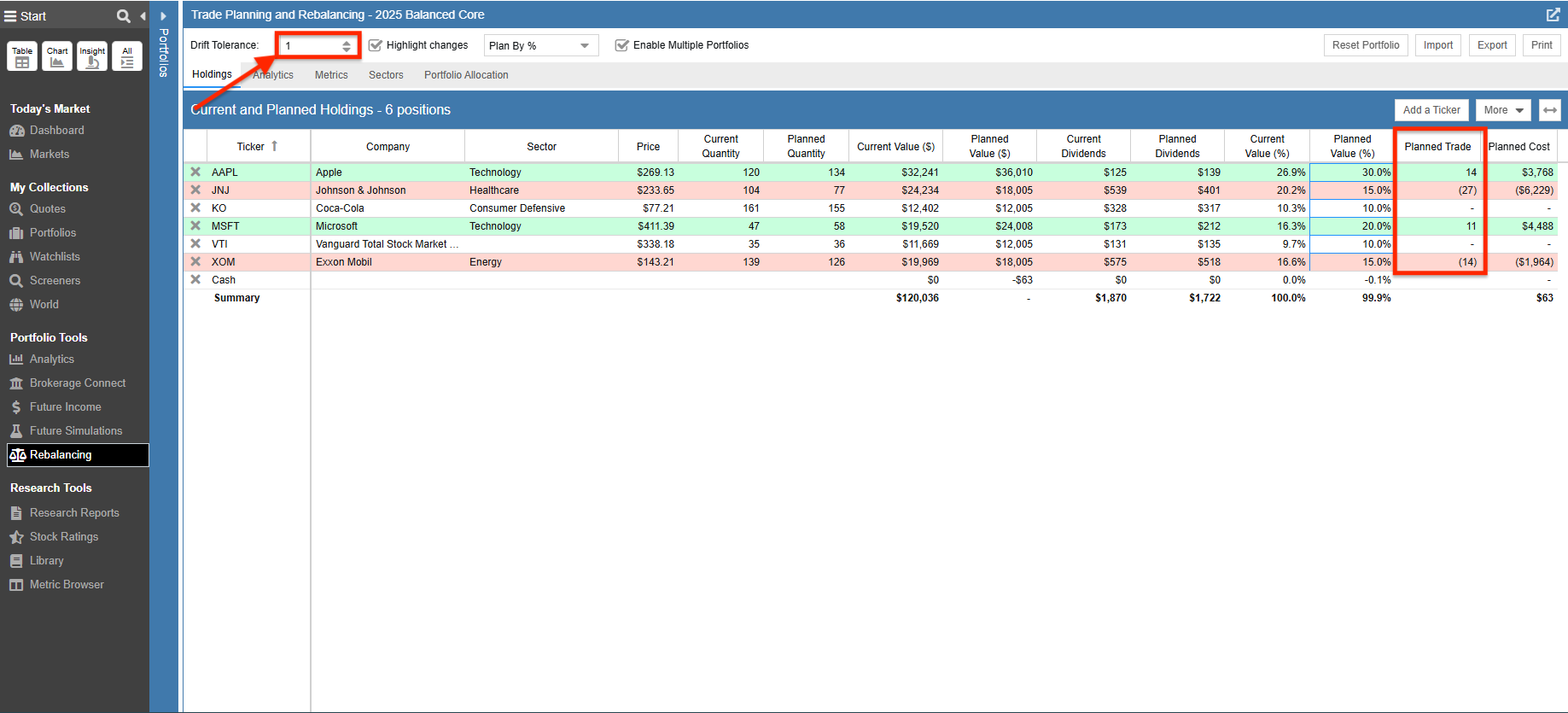
(Above: The “Planned Trade” column generates our shopping list automatically, color-coding buys in green and sells in red.)
Stock Rover doesn’t place the trades for you, but it does make the hand-off easy. Once your rebalancing plan is set, you can use the “Export” or “Email” features in the Rebalancing Tool to send the precise trade list to yourself. This gives you a clear checklist to follow when logging into your brokerage account, reducing the risk of errors.
Conclusion: The Cycle is Complete
By following this three-part guide, we have moved from reactive investors to proactive portfolio managers:
- We Tracked our assets automatically (Part 1 [9]).
- We Analyzed our risk with deep analytics (Part 2 [10]).
- We Rebalanced our holdings to lock in gains and manage risk (Part 3).
Common Questions About Rebalancing
Does portfolio rebalancing actually improve returns?
Its primary goal is risk control, not just higher returns. However, by systematically “buying low and selling high” (e.g., selling JNJ at a peak to buy Apple in a dip), rebalancing often improves long-term performance by protecting you from severe drawdowns.
How often should I rebalance my portfolio?
Most experts recommend reviewing your portfolio quarterly or annually. Alternatively, you can use “Threshold Rebalancing” (like Stock Rover’s Drift Tolerance), which shows you when an allocation is off by a specific percentage (e.g., >5%). This prevents over-trading.
Note: Portfolio Analytics and Rebalancing require a Premium or Premium Plus subscription. You can explore all plan options here [11].